

By Mitch Rice
Have you ever found the perfect image, only to see it turn into a blocky, pixelated mess when you try to enlarge it? It’s a common frustration for marketers, designers, and anyone who works with digital media. A tiny, low-resolution photo just won’t work for a website banner, a high-quality print, or a social media post. In the past, your only option was to find a new image. Today, there’s a much better solution.
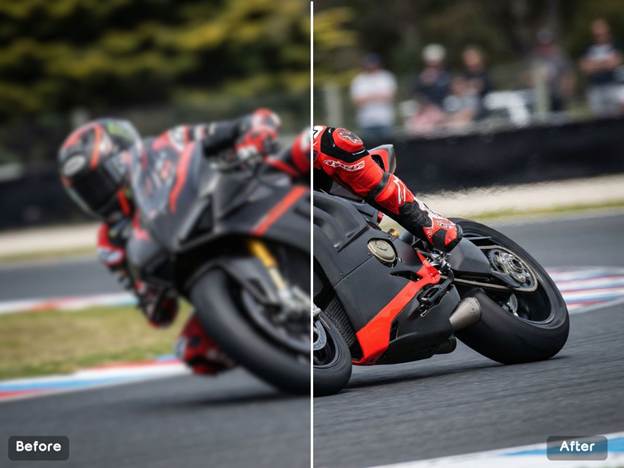
AI has completely changed how we handle image quality. You no longer need complicated software or technical skills to fix blurry pictures. With the right tools, you can now increase image resolution, sharpen details, and even create entirely new visuals with just a few clicks. This guide will show you exactly how to do it in 2026, focusing on the best and most efficient methods available.
The Best Way to Enhance Your Photos: AI Upscaling
What exactly is image upscaling? It’s the process of taking a low-resolution image and increasing its size without losing quality. Traditional methods simply stretched the pixels, which resulted in that familiar blurry outcome. AI, on the other hand, is much smarter. It analyzes the image, understands the context of the objects within it, and intelligently adds new pixels that look natural and sharp. It’s like a digital artist meticulously restoring a photograph. For anyone needing to make a small picture bigger, an AI Image Upscaler is the number one solution. It turns fuzzy, unusable images into crisp, professional-looking assets ready for any project.
Beyond just improving old photos, AI can also generate entirely new visuals from scratch. Imagine needing a specific image that you can’t find anywhere online, like a “cat wearing a spacesuit on Mars.” Instead of spending hours searching, you can now describe it in plain text and have a machine create it for you. An AI Image Generator offers incredible creative freedom, allowing you to produce unique visuals for blog posts, advertisements, or artistic projects in a matter of seconds. It’s a powerful tool for bringing your most imaginative ideas to life.
Why Choose an AI-Powered Tool?
You might be wondering what makes these modern tools so effective. The answer lies in their training. These AI models have learned from millions of images, enabling them to recognize patterns, textures, and shapes with incredible accuracy.
Here’s what sets them apart:
* Incredible Detail Restoration: AI doesn’t just make images bigger. It actively identifies and refines details that were lost in the low-resolution version. Faces become clearer, text becomes readable, and textures become more defined.
* Ease of Use: Forget about complex settings and confusing interfaces. Most AI upscalers are built for simplicity. You typically just upload your image, choose a scaling factor like 2x or 4x, and let the tool do the work.
* Speed and Efficiency: What used to take a skilled photo editor a significant amount of time can now be done in seconds. This allows you to improve your workflow and focus on the creative aspects of your project.
* Versatility: These tools work on all types of images, from old family photos and digital art to e-commerce product shots and real estate pictures.
How to Upscale an Image: A Simple Step-by-Step Guide
Using an AI upscaler is straightforward. While every tool has a slightly different interface, the core process is almost always the same.
Step 1: Choose Your Image
Start with the image you want to enhance. For the best results, try to use the highest quality version you have. While AI can work miracles, starting with an extremely pixelated or tiny image can be challenging even for the most advanced systems. A photo from an old phone is a much better starting point than a thumbnail saved from a website.
Step 2: Upload to the AI Upscaler
Navigate to your chosen AI upscaling tool. You’ll find an option to upload or drag and drop your image file onto the platform. The tool will accept common formats like JPG, PNG, and WEBP. The upload process is usually very fast.
Step 3: Select Your Upscaling Factor
Once the image is uploaded, you’ll need to decide how much larger you want it to be. Most tools offer options like 2x, 4x, or even 8x the original size.
* 2x Upscaling: This is great for making minor improvements or when you need a slightly larger image for a website.
* 4x Upscaling: This is a popular choice for turning a standard-definition photo into a high-definition one, perfect for prints or large digital displays.
* 8x Upscaling: This is for situations where you need a massive increase in resolution, like preparing a small image for a large poster or banner.
Step 4: Let the AI Work Its Magic
After you select the scaling factor, the AI will begin processing the image. This usually takes just a few seconds. The system analyzes the image, predicts what the missing pixels should look like, and generates a new, high-resolution version.
Step 5: Download Your Enhanced Image
The tool will present you with a preview of the upscaled image, often with a slider to compare it to the original. You’ll be able to see the dramatic improvement in clarity and detail. If you’re happy with the result, simply click the download button to save the new, larger image to your device.
Creating New Looks: From Text to Visuals with AI
Enhancing existing photos is just one side of the coin. The other is creating entirely new visuals with an AI image generator. This technology, known as text-to-image generation, opens up a world of creative possibilities.
How AI Image Generation Works
The process is delightfully simple for the user. You write a text description, called a “prompt,” of the image you want to create. The AI interprets your words and generates a unique image based on that description.
A good prompt is key to getting a great result. The more descriptive you are, the better the AI can understand your vision.
Examples of Prompts:
* Simple Prompt: “A running dog.”
* Detailed Prompt: “A golden retriever joyfully running through a field of yellow flowers at sunset, cinematic lighting, highly detailed.”
The detailed prompt gives the AI more information to work with, resulting in a much more specific and often higher-quality image. You can specify the subject, the setting, the art style (e.g., “photorealistic,” “oil painting,” “cartoon”), the lighting, and even the mood.
Practical Use Cases for AI Image Tools
Who can benefit from AI image upscaling and generation? The answer is just about everyone. These tools are no longer just for tech experts; they are practical solutions for everyday problems.
For Marketers and Small Business Owners
High-quality visuals are essential for capturing customer attention. Marketers can use AI upscalers to improve product photos for e-commerce stores, ensuring customers can see every detail. They can also enhance images for social media campaigns, email newsletters, and website banners, creating a professional and polished brand look without needing a big budget for photography.
For Photographers and Designers
Even professionals work with less-than-perfect images sometimes. Photographers can use AI to restore old client photos or rescue a great shot that was taken at a low resolution. Graphic designers can upscale small design elements or logos provided by clients, saving time and avoiding the need to recreate assets from scratch.
For Content Creators and Bloggers
A compelling blog post needs great images. AI image generators are perfect for creating custom featured images, infographics, and other visuals that perfectly match the content. This helps creators avoid using the same generic stock photos that everyone else uses, making their content more unique and engaging.
For Personal Use
Have a treasured family photo that’s old, faded, and small? An AI upscaler can breathe new life into it, sharpening faces and restoring colors. You can finally get a beautiful, large print of a photo that has been sitting on your hard drive for years. It’s a wonderful way to preserve precious memories for future generations.
The Future is Clearer Than Ever
The rapid advancements in AI mean that the problem of low-resolution images is quickly becoming a thing of the past. What once required expensive software and expert-level skills is now accessible to anyone with an internet connection.
Whether you’re looking to improve the quality of an existing photo or create a brand new visual from your imagination, AI-powered tools provide a fast, simple, and effective solution. They empower you to be more creative and professional in your work, breaking down the technical barriers that used to stand in the way. The next time you encounter a blurry or pixelated image, you’ll know exactly what to do.
Data and information are provided for informational purposes only, and are not intended for investment or other purposes.